A well-structured BOQ format for steel structure in Excel is one of the most powerful tools a structural steel contractor or estimator can have. It drives accurate estimating, clarifies scope for clients and consultants, and speeds up bid preparation while reducing costly errors. In a competitive market like Florida, where wind loads, corrosion protection, and tight schedules are everyday realities, a professional Excel BOQ can be the difference between winning profitable work and chasing change orders.
This guide explains what a steel structure BOQ is, how to structure it in Excel for clarity and accuracy, which columns and formulas to use, and how to avoid common mistakes. You’ll also see a sample BOQ layout and learn how Estimate Florida’s Structural Steel Works BOQ Template ($49) can save you hours of setup time on every project.
 Buy Structural Steel Works BOQ Template at $49 Only
What Is a Steel Structure BOQ and Why Use Excel?
A Bill of Quantities (BOQ) for steel structure is a structured list of all steel-related work items for a project. Each item includes a clear description, unit of measurement, quantity, unit rate, and total amount. The BOQ is used for tendering, cost control, progress billing, and change order management.
In simple terms, a steel structure BOQ answers:
-
What steel work is included?
-
In what quantities?
-
At what rates?
-
For what total cost?
Excel is the most widely used tool for preparing steel BOQs because it is:
-
Flexible and customizable: You can adapt columns, groups, and formulas to match any contract or client requirement.
-
Formula-driven: Automatic calculations for unit rates, amounts, subtotals, and grand totals reduce manual errors.
-
Familiar: Most estimators, quantity surveyors, and contractors already use Excel daily.
-
Portable and shareable: Easy to send to clients, consultants, and internal teams without special software.
A well-designed Excel BOQ improves:
-
Accuracy: Fewer manual calculation errors and omissions.
-
Consistency: Same structure and logic across multiple projects.
-
Speed: Faster updates when quantities or rates change.
-
Transparency: Clear breakdown of costs for internal review and client communication.
Buy Structural Steel Works BOQ Template at $49 Only
Key Elements of a Good BOQ Format for Steel Structure in Excel
To build a reliable BOQ format for steel structure in Excel, focus on these core elements.
Clear Item Coding and Numbering
Use a logical numbering system to organize your BOQ items:
-
Sequential numbers: 1, 2, 3… or structured codes like 1.1, 1.2, 1.3…
-
Group-based coding: for example, 1xx for primary steel, 2xx for secondary steel, 3xx for cladding, 4xx for accessories, 5xx for surface protection, 6xx for erection and indirects.
Benefits of clear coding:
-
Easy reference in drawings, emails, and meeting minutes.
-
Simple tracking of variations and additional items.
-
Clear audit trail for consultants and clients.
Detailed Item Descriptions
Each BOQ item description should be specific enough to avoid ambiguity. Include:
-
Type of member: column, beam, truss, purlin, girt, bracing, etc.
-
Material grade and section: e.g., A992 W-shapes, A36 angles, HSS sections.
-
Scope included: supply, fabrication, erection, surface protection.
-
Special requirements: fire-proofing, galvanizing, intumescent coating, special inspections.
Example of a good description:
“Supply, fabrication, and erection of primary steel columns, A992 W-shapes, including base plates, anchor bolt coordination, shop primer, and site touch-up paint.”
Clear descriptions reduce disputes during billing and change orders.
Buy Structural Steel Works BOQ Template at $49 Only
Correct Units of Measurement
Use units that align with your contract and industry practice:
-
Ton or kg for structural steel members (primary and secondary).
-
Square feet or square meters for cladding, sheeting, and insulation.
-
Meter for handrails, gutters, flashings, and linear accessories.
-
Number (nos.) for items like anchor bolts, ladders, access hatches, and specialized fixtures.
Consistency in units is critical. Mixing tons and kg or sq ft and sq m without clear conversion leads to calculation errors and miscommunication.
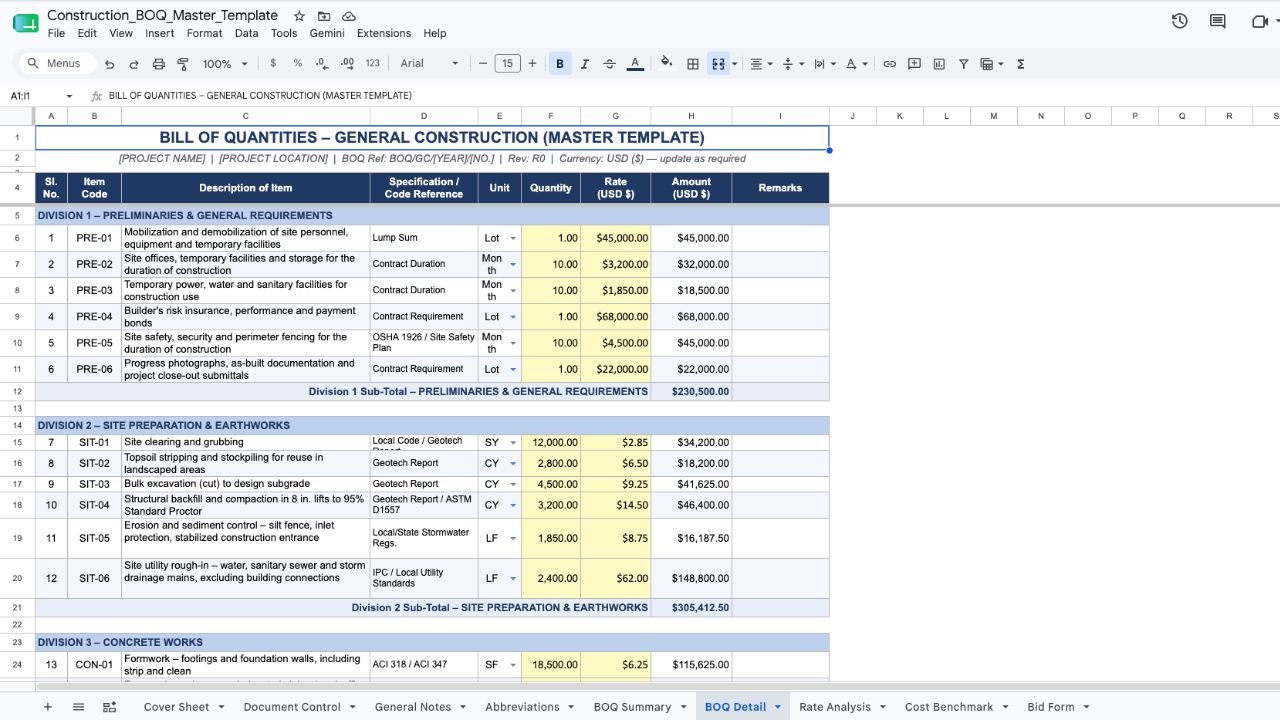
Quantity, Rate, and Amount Columns
The core of any steel BOQ is the quantity–rate–amount structure:
-
Quantity: measured from drawings and specifications.
-
Unit rate: comprehensive rate per unit (material + fabrication + erection + other costs).
-
Amount: Quantity × Unit Rate.
In Excel, these should be formula-driven:
-
Amount = Quantity × Total Unit Rate.
-
Total Unit Rate = Sum of component rates (if using a detailed breakdown).
Automation ensures that when you update a quantity or rate, all related totals recalculate instantly and accurately.
Separate Columns for Cost Breakdown (Optional but Useful)
For more detailed BOQs, consider separate rate columns:
-
Material cost per unit.
-
Fabrication cost per unit.
-
Erection cost per unit.
-
Finishes/coatings/other cost per unit.
-
Total unit rate (sum of all components).
This approach helps you:
-
Understand which cost drivers dominate each item.
-
Adjust rates quickly when only one component changes (e.g., steel price fluctuation).
-
Provide transparent breakdowns for clients or auditors.
Buy Structural Steel Works BOQ Template at $49 Only
Summary and Totals Section
Every professional BOQ needs a clear summary:
-
Subtotals by major groups (primary steel, secondary steel, cladding, accessories, etc.).
-
Total steel tonnage.
-
Grand total for steel works.
-
Separate sections for indirect costs, overheads, contingency, and profit if not included in unit rates.
Use Excel’s SUM and SUBTOTAL functions to keep these dynamic. When items are added or removed, summaries should update automatically.
Recommended Column Structure for Steel Structure BOQ in Excel
Below is a practical column layout you can implement directly in your Excel BOQ format for steel structure.
Key formulas:
-
Total Unit Rate (Column I):
=SUM(E2:H2) -
Amount (Column J):
=D2*I2 -
Group Subtotals: Use
SUMorSUBTOTALover the Amount column for each group. -
Grand Total:
=SUM(J2:J100)(adjust range as needed).
Formatting tips:
-
Use currency format for all rate and amount columns.
-
Use number format with 2 decimal places for quantities.
-
Bold header row and apply borders for readability.
-
Freeze the top row so headers stay visible when scrolling.
Buy Structural Steel Works BOQ Template at $49 Only
Step‑by‑Step: How to Create a Steel Structure BOQ in Excel
Follow this structured process to build a professional BOQ format for steel structure in Excel.
-
Define the BOQ Structure and Groups
Decide on major groups that match your typical scope:-
Substructure/anchor bolts.
-
Primary steel frame (columns, rafters, trusses).
-
Secondary steel and bracing (purlins, girts, eave struts, sag rods).
-
Cladding and insulation (roof and walls).
-
Accessories (stairs, handrails, ladders, platforms, mezzanine).
-
Surface protection and fire-proofing.
-
Erection and indirect costs (if not embedded in unit rates).
For large projects, use separate sheet tabs for each group.
-
-
Set Up Columns and Headers
Create the column structure described above. Apply consistent formatting:-
Bold headers.
-
Borders around cells.
-
Currency format for rates and amounts.
-
Number format for quantities.
-
-
Enter Item Descriptions and Units
List all steel items with clear, contract-aligned descriptions. Assign appropriate units based on how the contract measures and pays for each item. -
Input Quantities from Take‑Off
Enter quantities from your structural take-off. Double-check for:-
Missing members or connections.
-
Consistency between drawings, specs, and BOQ items.
-
Correct units (tons vs kg, sq ft vs sq m).
-
-
Build Unit Rates
For each item, build up the unit rate from:-
Material cost (based on current market rates per ton or per kg).
-
Fabrication cost (shop labor, equipment, consumables, overheads).
-
Erection cost (field labor, cranes, rigging, site overheads).
-
Finishes/coatings/other costs (primer, paint, galvanizing, fire-proofing).
Use separate columns for a detailed breakdown or a single “Unit Rate” column for a simpler BOQ.
-
-
Add Excel Formulas
Implement formulas to automate calculations:-
Total Unit Rate:
=SUM(E2:H2)(or equivalent based on your columns). -
Amount:
=D2*I2. -
Group Subtotals and Grand Total: Use
SUMorSUBTOTALover the Amount column.
Protect formula cells to prevent accidental overwriting.
-
-
Add Summary and Totals
Create a summary section showing:-
Subtotals by major group.
-
Total steel tonnage.
-
Total cost for steel works.
Optionally, add a separate section for overheads, contingency, and profit if these are not included in unit rates.
-
-
Review and Standardize
Check for:-
Calculation errors.
-
Inconsistent units or descriptions.
-
Missing items or scopes.
Save this as a master template for future projects. This exact logic is built into Estimate Florida’s Structural Steel Works BOQ Template, which provides a ready-made Excel structure so estimators only need to input quantities and rates.
-
Buy Structural Steel Works BOQ Template at $49 Only
Sample BOQ Format for Steel Structure in Excel (Illustrative)
The table below illustrates how a steel structure BOQ might look in Excel. In a real file, formulas would automatically calculate “Total Unit Rate” and “Amount.”
Notes:
-
This is an illustrative example; actual items and rates must be project-specific.
-
In a real Excel file, formulas would automatically calculate “Total Unit Rate” and “Amount.”
-
Additional sheets or sections can be added for cladding, accessories, and indirect costs.
Buy Structural Steel Works BOQ Template at $49 Only
Common Mistakes in Steel Structure BOQ Preparation in Excel
Avoid these frequent errors to keep your BOQ accurate and defensible:
-
Inconsistent units: Mixing tons and kg, or sq ft and sq m, without clear conversion leads to major calculation errors.
-
Vague descriptions: Items like “steel work” or “structural steel” without specifying members, grades, or scope invite disputes during billing.
-
Missing items: Forgetting connections, base plates, stairs, handrails, or surface protection can cause significant underestimation.
-
Manual calculations: Not using Excel formulas means every change requires manual updates, increasing the risk of errors.
-
No separation of cost components: A single lump-sum rate makes it hard to adjust when only material or fabrication costs change.
-
Poor structure: No clear grouping or item numbering makes the BOQ hard to read, audit, and update.
-
Hard-coded totals: Typing totals instead of using formulas causes mismatches when quantities or rates are revised.
Each of these mistakes can lead to wrong estimates, disputes with clients or consultants, and erosion of profit margins. A standardized Excel BOQ format reduces these risks by enforcing consistency, clarity, and automation.
How Estimate Florida’s Structural Steel Works BOQ Template Helps
If you regularly prepare steel structure BOQs, building them from scratch for every project is time-consuming and error-prone. Estimate Florida’s Structural Steel Works BOQ Template is designed specifically for structural steel contractors, estimators, and quantity surveyors who want a professional, Excel-based BOQ out of the box.
What it includes:
-
Pre-built item groups aligned with typical steel scopes: primary steel, secondary steel, cladding, accessories, surface protection, erection, and indirects.
-
Complete column structure with material, fabrication, erection, and other rate columns.
-
Built-in formulas for automatic calculation of unit rates, amounts, subtotals, and grand totals.
-
Professional, client-ready formatting suitable for bids, internal reviews, and progress billing.
Benefits:
-
Saves hours of setup time on each new project.
-
Reduces the risk of missing items, wrong units, or calculation errors.
-
Provides a consistent BOQ structure that can be used across your team.
-
Makes it easy to update rates or quantities without breaking the sheet.
Pricing and availability:
The Structural Steel Works BOQ Template is available for $49 as a one-time purchase from Estimate Florida. It’s built from real projects and refined over years of estimating work in Florida and beyond.
If you want a ready-to-use Excel BOQ structure instead of building one from scratch, you can get our Structural Steel Works BOQ Template for $49 from Estimate Florida.
Best Practices for Maintaining Your Steel BOQ Excel Template
To get maximum value from your BOQ format for steel structure in Excel, adopt these best practices:
-
Keep a master template: Maintain a clean, project-free version with standard groups, columns, and formulas that can be reused for every new job.
-
Use consistent formatting: Same font, number formats, and color coding across all BOQs improve readability and professionalism.
-
Protect formula cells: Lock cells with formulas to prevent accidental changes that could break calculations.
-
Maintain a rate library: Keep a separate sheet or file with standard material, fabrication, and erection rates. Update it periodically based on market changes.
-
Version control: Clearly name files with project name, date, and version (e.g., “Warehouse_A_BOQ_v2_2026-07.xlsx”) to avoid confusion.
These practices improve accuracy, speed, and credibility over time, making your estimating process more efficient and reliable.
Final Thoughts: Standardize Your Steel BOQ Process in Excel
A well-structured BOQ format for steel structure in Excel is a core tool for accurate estimating, clear communication, and effective cost control. Investing time in a good template pays off across multiple projects through faster bid preparation, fewer errors, and more professional submissions.
Estimate Florida understands the demands of structural steel estimating and Excel-based BOQs. We help contractors and consultants turn complex steel scopes into clear, defensible, and profitable bids.
Use this guide as a checklist for your own Excel BOQs. If you want to accelerate the process and standardize your templates, consider adopting a pre-built solution like the Structural Steel Works BOQ Template from Estimate Florida, available for $49, to streamline your workflow and reduce estimation risk.
If you need help with broader construction estimating, Estimate Florida also provides concrete, electrical, and MEP estimating services for contractors across the US.