Plumbing software for small business in Florida helps contractors organize leads, customers, estimates, scheduling, dispatch, field work, invoices, payments, inventory, and reporting in one system. Instead of relying on separate spreadsheets, paper work orders, text messages, and disconnected accounting records, a plumbing company can use a structured digital workflow to manage jobs from the first customer inquiry through final payment.
Florida plumbing businesses often handle fast-moving residential service calls, renovations, new construction, commercial maintenance, emergency work, and recurring property-management accounts. A practical software system can help the office and field team stay aligned while giving owners better visibility into workload, job status, costs, and outstanding invoices.
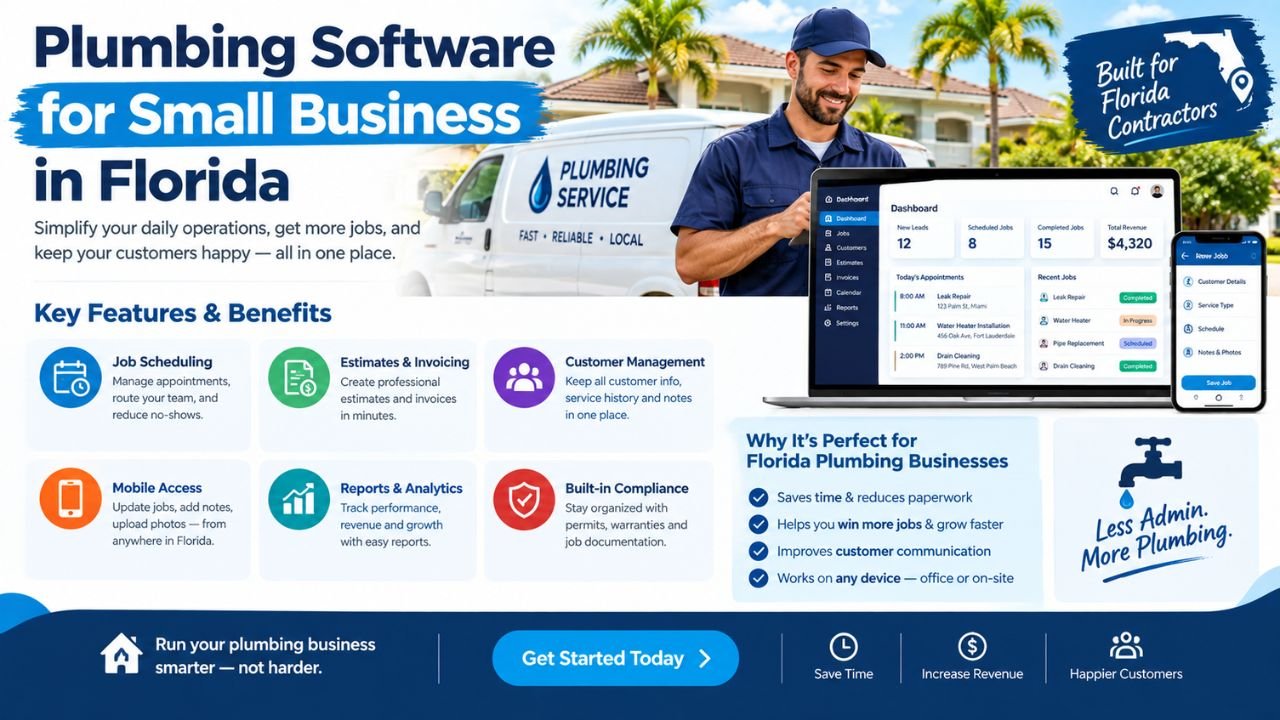
Some companies can use off-the-shelf field service software effectively. Others need customized plumbing software Florida businesses can use around their actual estimating, dispatch, documentation, and billing processes.
Estimate Florida can build customized plumbing software for your business. To discuss your requirements, email us at info@estimateflorida.com.
What Is Plumbing Software?
Plumbing software is a digital system that helps a plumbing contractor manage daily business operations. It may be a web application, a mobile plumbing app, a desktop platform, or a combination of office and field tools.
A typical system may combine:
-
Customer relationship management.
-
Lead tracking.
-
Job scheduling.
-
Technician dispatch.
-
Estimates and proposals.
-
Work orders.
-
Digital signatures.
-
Invoices and payment links.
-
Job costing.
-
Material and inventory tracking.
-
Photo and document storage.
-
Customer notifications.
-
Performance reporting.
General field service software may support many industries, including electrical, HVAC, cleaning, landscaping, and plumbing. A plumbing-specific or customized system can include workflows that reflect plumbing work more closely, such as service categories, fixture information, pipe repair notes, water-heater replacements, drain-cleaning history, emergency call types, and material usage.
The goal is not to add complexity. The goal is to put the right information in the right place so the office, technicians, managers, and customers can follow the progress of a job.
Why Small Plumbing Businesses in Florida Need Software
A small plumbing company may begin with a phone, calendar, spreadsheet, and accounting program. That arrangement can work when the owner handles only a few jobs personally. As call volume increases, information can become difficult to track.
Common operational challenges include:
-
Managing multiple service calls during the same day.
-
Coordinating technicians across cities and counties.
-
Tracking emergency and after-hours work.
-
Preparing plumbing estimates quickly from the field.
-
Keeping customer details and property history organized.
-
Monitoring unpaid plumbing invoices.
-
Managing parts, fittings, fixtures, and equipment.
-
Tracking profitability by job.
-
Keeping office and field employees aligned.
-
Maintaining organized business records.
-
Following up on estimates that have not been approved.
-
Recording customer approvals and scope changes.
A Florida plumbing contractor may serve residential customers in one area, property managers in another, and commercial or construction clients elsewhere. The business may also experience changing demand caused by storms, seasonal occupancy, property turnover, renovations, and emergency repairs.
Software can improve visibility by showing:
-
Which jobs are scheduled.
-
Which technicians are assigned.
-
Which estimates are awaiting approval.
-
Which jobs are incomplete.
-
Which invoices remain unpaid.
-
Which materials were used.
-
Which service categories produce the most work.
This does not guarantee higher revenue or specific savings. It gives the business a more organized operating structure for making decisions.
Essential Features of Plumbing Business Software
The best feature set depends on the company’s size, service model, number of technicians, and budget. A solo plumber may need a simpler system than a company managing several crews and commercial accounts.
A small business does not need every feature on the first day. It is often better to start with the core workflow and add features as the team becomes comfortable.
Plumbing Estimating and Quoting Features
Plumbing estimating software for small business can help contractors prepare consistent quotes without rebuilding every estimate from the beginning.
Useful estimating functions include:
-
Standardized service items.
-
Stored labor rates.
-
Material price lists.
-
Markup and overhead settings.
-
Travel charges.
-
Emergency or after-hours charges.
-
Minimum service fees.
-
Multiple estimate options.
-
Discounts and deposits.
-
Change orders.
-
Customer approvals.
-
Photos and notes.
-
Conversion from estimate to work order.
-
Conversion from completed work to invoice.
For example, a drain-repair estimate might include:
-
Diagnostic labor.
-
Access or removal work.
-
Drain-cleaning equipment.
-
Replacement fittings.
-
Restoration allowance.
-
Disposal.
-
Travel.
-
Applicable markup.
Once the customer approves the estimate, the software could convert it into a work order with the scope, customer information, site address, notes, and approved amount.
When the work is complete, the technician or office staff could record actual labor and materials. The system could then generate an invoice while preserving the original estimate for comparison.
Fast and consistent quoting matters when a small plumbing company competes for residential repairs, commercial maintenance, property-management work, and renovation projects. A well-organized process can also reduce errors caused by copying information between paper notes, text messages, spreadsheets, and invoices.
Scheduling and Dispatch for Florida Plumbers
Plumbing scheduling and invoicing software should reflect the company’s actual service territory and work model. A single scheduling approach will not be ideal for every business.
Customized scheduling can manage:
-
Service areas.
-
Technician availability.
-
Appointment windows.
-
Emergency calls.
-
Recurring maintenance.
-
Project milestones.
-
Travel time.
-
Job priority.
-
Customer reminders.
-
Technician skills.
-
Required tools or materials.
-
Access instructions.
-
Tenant or property-manager contacts.
Florida businesses may serve South Florida, Central Florida, North Florida, coastal communities, inland areas, or several regions at once. Travel time can have a significant effect on scheduling, especially when the company handles emergency work or serves a wide geographic area.
A dispatch screen might show:
-
Unassigned jobs.
-
Jobs waiting for customer confirmation.
-
Technician location or current status.
-
Scheduled start time.
-
Priority level.
-
Estimated duration.
-
Required equipment.
-
Notes from previous visits.
The system should make it easy to reschedule a job, update the customer, assign another technician, and record the reason for a change.
Mobile Software for Field Technicians
A mobile plumbing app or mobile-friendly web system should be designed around field conditions. Technicians may work in mechanical rooms, crawl spaces, garages, construction sites, occupied homes, commercial buildings, and outdoor service areas.
Field users may need to:
-
View assigned jobs.
-
Access customer and property history.
-
Review the approved scope.
-
See equipment or fixture notes.
-
Upload before-and-after photos.
-
Record labor and materials.
-
Update job status.
-
Add technician notes.
-
Collect customer signatures.
-
Send invoices or payment links.
-
Record follow-up recommendations.
-
Request additional approval.
-
Mark a job ready for billing.
Limited connectivity may also matter in some locations. A system should be evaluated for how it behaves when the technician has a weak signal or temporarily loses access to the internet.
Usability is more important than simply having a large number of features. If technicians cannot update a job quickly, the office may continue relying on phone calls, texts, and handwritten notes.
Useful field screens should be:
-
Simple.
-
Fast to load.
-
Easy to read on a phone.
-
Organized around the next action.
-
Clear about required information.
-
Flexible enough for notes and photos.
Customized Plumbing Software vs Off-the-Shelf Software
Off-the-shelf software can be practical when a company’s workflow matches the platform’s built-in processes. Custom software may be useful when the company needs specialized estimating, customer portals, reports, integrations, or project workflows.
A company should not choose custom development simply because it sounds more advanced. Custom development is most useful when the business has clear workflow requirements that standard software does not handle efficiently.
How Estimate Florida Can Build Customized Plumbing Software
Estimate Florida can plan and build software around a plumbing company’s specific operating model. The system may be designed for a solo owner-operator, a small residential service company, a multi-technician business, or a contractor managing service and project work.
A practical custom software development process may include:
-
Discovery call or requirements email. The business explains its current process, team structure, service areas, and goals.
-
Workflow review. The development team examines how calls, estimates, dispatch, work orders, materials, invoices, and payments are currently handled.
-
Problem identification. Bottlenecks, repeated data entry, communication gaps, and reporting problems are documented.
-
User-role definition. The system may include separate roles for owners, office staff, dispatchers, estimators, technicians, managers, and accounting users.
-
Module planning. Screens, dashboards, forms, notifications, reports, and data fields are mapped.
-
Prototype or design. The business can review the planned workflow before full development.
-
Core development. The selected modules are built in stages.
-
Testing with realistic jobs. The system is tested using actual examples such as emergency calls, water-heater replacements, drain repairs, remodel work, and recurring maintenance.
-
Data setup or migration. Customer records, service items, pricing, technicians, and other information may be prepared for the new system where applicable.
-
Training and launch. Users learn how to perform their daily tasks, and the system is introduced in a controlled way.
-
Ongoing improvements. Additional reports, integrations, workflows, and user-interface refinements may be added as requirements become clearer.
Estimate Florida can build customized plumbing software for your business. To discuss your requirements, email us at info@estimateflorida.com.
Florida-Specific Business Considerations
Software can help organize plumbing operations, but it does not replace professional advice, legal guidance, licensing decisions, code interpretation, tax advice, or safety procedures.
Florida plumbing businesses may need workflows for:
-
Multiple service territories.
-
Residential and commercial customers.
-
Emergency and storm-related demand.
-
Humidity and coastal conditions.
-
Corrosion-related repairs.
-
Customer documentation.
-
Permit and inspection records.
-
Contractor and business records.
-
Insurance coordination.
-
Accounting coordination.
-
Property-manager approvals.
-
Tenant access instructions.
-
Before-and-after photographs.
For information related to Florida professional and business requirements, companies can review the Florida Department of Business and Professional Regulation. For construction-related code information, consult the Florida Building Code.
A software system may include fields for permit numbers, inspection dates, job photographs, customer approvals, and related documents. Those features help organize records, but the business should confirm applicable requirements with appropriate professionals and authorities.
The workflow may also differ by customer type:
-
Homeowners may need appointment reminders, estimates, and payment links.
-
Property managers may need multiple properties, approval limits, purchase orders, and consolidated invoices.
-
Builders may need project milestones, subcontractor coordination, and documentation.
-
Commercial clients may need recurring service, asset history, and response-time records.
Integrations to Consider
Integrations should be selected according to actual business needs and budget. Connecting every possible tool can create unnecessary cost and complexity.
Useful integrations may include:
-
Accounting software.
-
Payment processors.
-
Email and text messaging.
-
Maps and routing.
-
Calendar systems.
-
Inventory platforms.
-
Customer portals.
-
Document storage.
-
CRM systems.
-
Reporting and analytics tools.
-
Payroll or time-tracking systems.
-
Equipment or asset records.
For example, an accounting integration may reduce duplicate invoice entry. A payment integration may allow customers to pay from a secure link. A maps integration may help dispatchers plan service areas. A customer portal may allow property managers to submit service requests and review job status.
Each integration should be evaluated for:
-
Setup cost.
-
Ongoing fees.
-
Data synchronization.
-
Error handling.
-
User permissions.
-
Vendor support.
-
Data export.
-
Business continuity if the third-party service changes.
Security, Data, and User Access
Plumbing businesses store customer addresses, phone numbers, invoices, payment status, photos, property information, and internal notes. The software design should consider who can access this information and how access is managed.
Questions to ask include:
-
Who can access customer information?
-
Are user roles available?
-
Can office staff and technicians see different information?
-
Is data backed up?
-
Can the company export its data?
-
How are passwords handled?
-
Is two-factor authentication available?
-
Are payment details handled securely?
-
Is there an audit trail?
-
Can access be removed when an employee leaves?
-
How are uploaded photographs and documents protected?
-
What happens if the software or hosting service is unavailable?
Do not assume that every platform uses the same security controls. Review technical documentation and obtain professional advice when the business handles sensitive information or has specific security obligations.
How Much Does Plumbing Software Cost?
The cost of plumbing software depends on the type of solution and the size of the business.
Common cost models include:
-
Subscription software.
-
Per-user pricing.
-
Per-job pricing.
-
One-time custom development.
-
Monthly support and maintenance.
-
Integration costs.
-
Data migration.
-
Training and onboarding.
-
Feature upgrades.
-
Hosting and infrastructure.
Estimate Florida’s custom software pricing should be discussed according to the project requirements. It may depend on the number of modules, users, integrations, design requirements, reporting needs, mobile features, data structure, and overall complexity. No fixed Estimate Florida price should be assumed without reviewing the scope.
A phased plan can be useful. The first version might include customers, estimates, scheduling, dispatch, work orders, and invoices. Later phases might add inventory, customer portals, advanced reports, recurring maintenance, or integrations.
How to Choose the Right Solution
Use the following checklist before selecting or commissioning a system:
-
List current workflow problems.
-
Identify must-have features.
-
Separate essential features from future upgrades.
-
Test the system using a real plumbing job.
-
Confirm mobile usability.
-
Review reporting options.
-
Check data export capabilities.
-
Understand support terms.
-
Consider accounting and payment integrations.
-
Compare total cost of ownership.
-
Involve office staff and technicians.
-
Document who owns and manages the data.
-
Confirm how changes and upgrades will be handled.
-
Review permissions for different users.
A useful test scenario might begin with a homeowner calling about a leaking water heater. Follow the process through lead entry, scheduling, dispatch, technician notes, estimate creation, customer approval, material recording, invoice generation, payment, and follow-up.
If the system handles that workflow clearly, it may be suitable for further evaluation.
Common Mistakes to Avoid
Small plumbing companies should avoid these common mistakes:
-
Choosing software based only on price.
-
Buying too many features at once.
-
Ignoring technician feedback.
-
Failing to test mobile use.
-
Not planning data migration.
-
Forgetting accounting integration.
-
Using inconsistent service-item pricing.
-
Failing to define user permissions.
-
Not documenting business processes.
-
Expecting software to fix unclear operating policies automatically.
-
Choosing a system that cannot export business data.
-
Adding integrations without a clear purpose.
-
Ignoring customer communication preferences.
-
Creating complex forms that technicians will not complete.
-
Failing to review reports after launch.
-
Treating implementation as an office-only project.
Technology works best when it supports a clear process. For example, the software cannot determine an appropriate emergency fee unless the business has defined how emergency calls should be priced.
Final Thoughts
The right plumbing software for small business in Florida should make estimating, scheduling, dispatch, customer management, invoicing, job costing, and reporting easier to organize. It should support the way the business actually works rather than forcing every company into the same process.
Off-the-shelf software may be sufficient for a company with standard service workflows. Customized plumbing software may be more useful when the business needs specialized estimates, project stages, customer portals, technician forms, property-management workflows, reports, or integrations.
The best system is practical, easy for the field team to use, clear for office staff, and scalable as the company grows. It should also provide a realistic path for data management, training, support, and future improvements.
If you need plumbing software designed around your business, email Estimate Florida at info@estimateflorida.com to discuss your requirements.