A Bill of Quantities (BOQ) is one of the most important documents in construction estimating, providing a clear, itemized breakdown of all work, materials, and costs for a project. For contractors, developers, and estimators in Florida and across the US, having a professional Construction BOQ template Excel file is essential for accurate bidding, financing, progress billing, and cost control. Excel remains the preferred format because it is easy to customize, uses simple formulas for automatic calculations, and is widely accepted by owners, lenders, and consultants.
Free download: sample house construction BOQ (Excel)
8 sections, about 30 line items, units and example quantities for a Florida CBS house, with subtotals and a summary sheet that calculate automatically.
Get the free sample BOQ or see the full BOQ template
 Buy Construction BOQ Template at $97 Only
In this article, you will learn what a construction BOQ includes, what features a good Construction BOQ template Excel file should have, and how to use such a template for residential and small commercial projects. You will also see a sample BOQ structure with Florida and US-relevant example items such as slab-on-grade foundations, concrete block walls, stucco finishes, tile roofing, and impact-resistant windows. Whether you are a general contractor, site engineer, project manager, or QS professional, this guide will help you understand how to use a construction estimate Excel template effectively.
What Is a Construction BOQ and Why Is It Important?
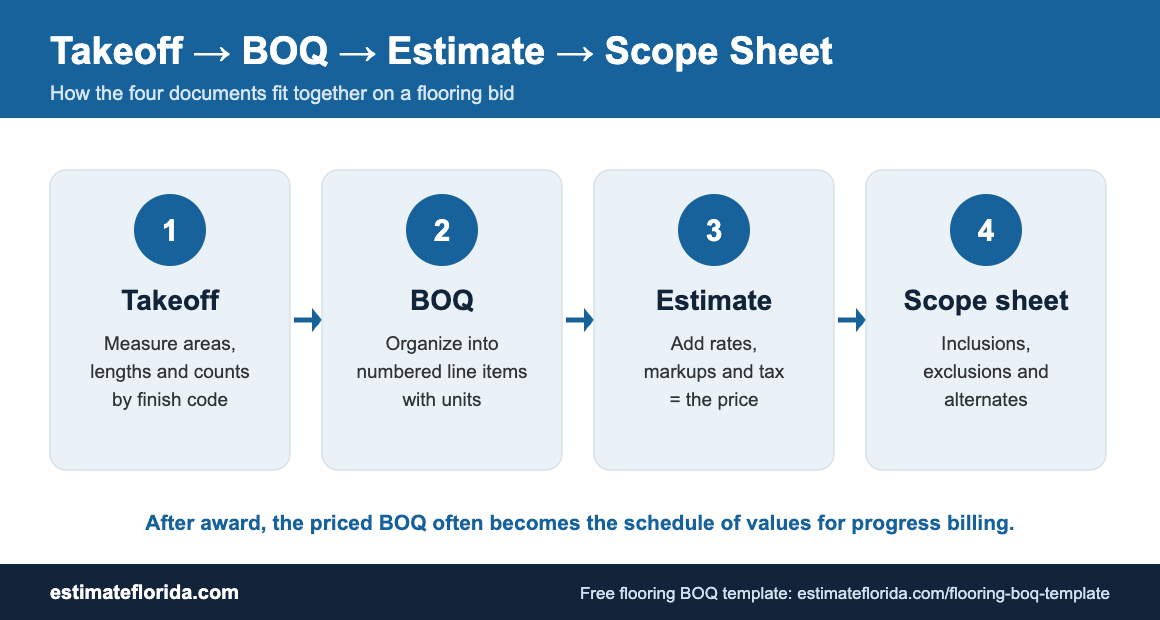
A Bill of Quantities, or BOQ, is a structured list of work items that describes every significant activity required to complete a construction project. Each item typically includes a clear description, unit of measurement, quantity, rate, and total amount. In residential and small commercial construction, the BOQ covers all major trades such as concrete, masonry, framing, roofing, finishes, basic MEP, and site work.
In the US and Florida, a BOQ is commonly used for:
-
Bidding and subcontractor comparisons.
-
Budgeting and financing approvals from banks and lenders.
-
Progress billing and draw requests during construction.
-
Change order pricing and cost tracking.
-
Final account settlement and closeout.
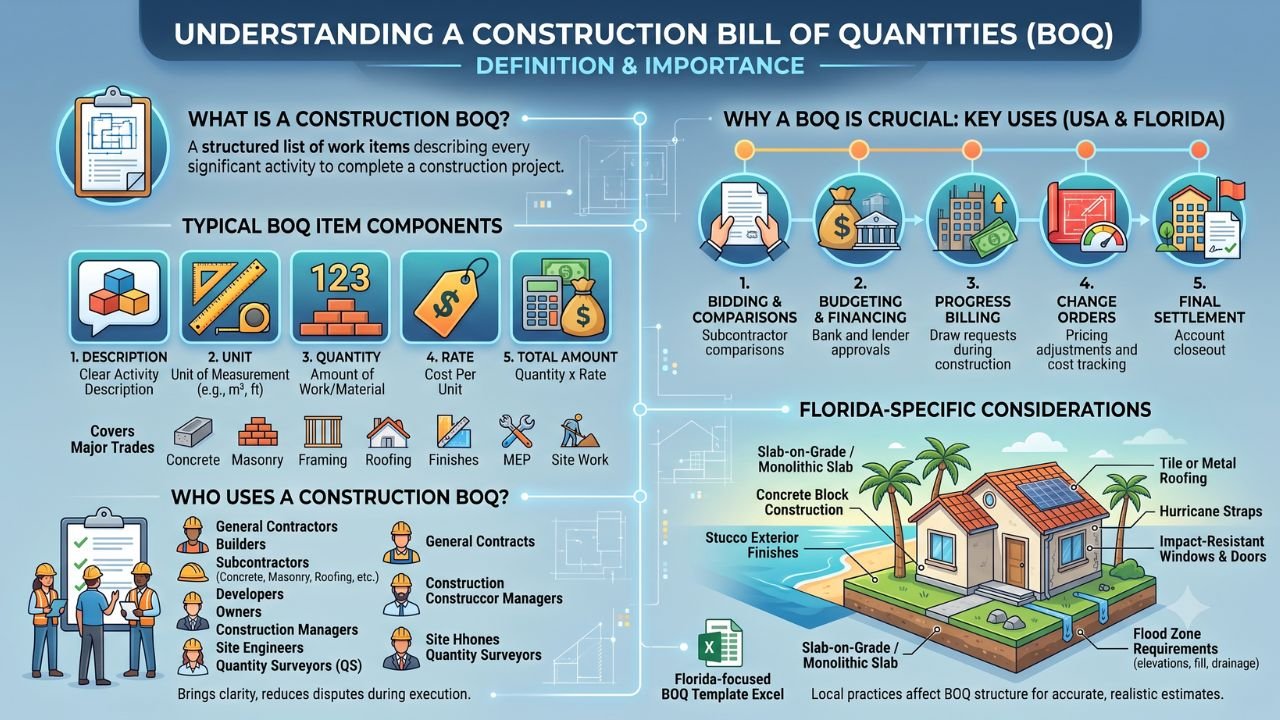
The audience for a construction BOQ includes general contractors and builders, subcontractors such as concrete, masonry, and roofing crews, developers, owners, construction managers, site engineers, and QS professionals. A well-prepared BOQ brings clarity to all parties and reduces disputes during execution.
Florida and many US regions have specific construction practices that affect how a BOQ is structured. Common features include slab-on-grade foundations, monolithic slabs, concrete block construction, stucco exterior finishes, tile or metal roofing, hurricane straps, and impact-resistant windows and doors in coastal zones. Flood zone requirements may also affect slab elevations, fill requirements, and drainage provisions. A Florida-focused bill of quantities template Excel should reflect these local conditions so that estimates are accurate and realistic.
Buy Construction BOQ Template at $97 Only
What Should a Good Construction BOQ Template Excel Include?
A professional Construction BOQ template Excel file should have several key features that make it easy to use, consistent, and reliable across multiple projects.
Clear header section
The header should include:
-
Project name and address.
-
Client name and contact details.
-
General contractor or consultant details.
-
BOQ reference number, date, and revision.
This information helps identify the project and track revisions over time.
Logical trade or section breakdown
A good Excel BOQ for construction should group items into logical sections such as:
-
General conditions and preliminaries.
-
Sitework and earthwork.
-
Concrete and foundations.
-
Masonry or framing.
-
Roofing.
-
Exterior finishes.
-
Doors, windows, and glazing.
-
Interior finishes.
-
Basic plumbing and electrical if in scope.
-
Site improvements and external works.
This structure makes the BOQ easier to read, review, and compare with other bids.
Buy Construction BOQ Template at $97 Only
Standard columns
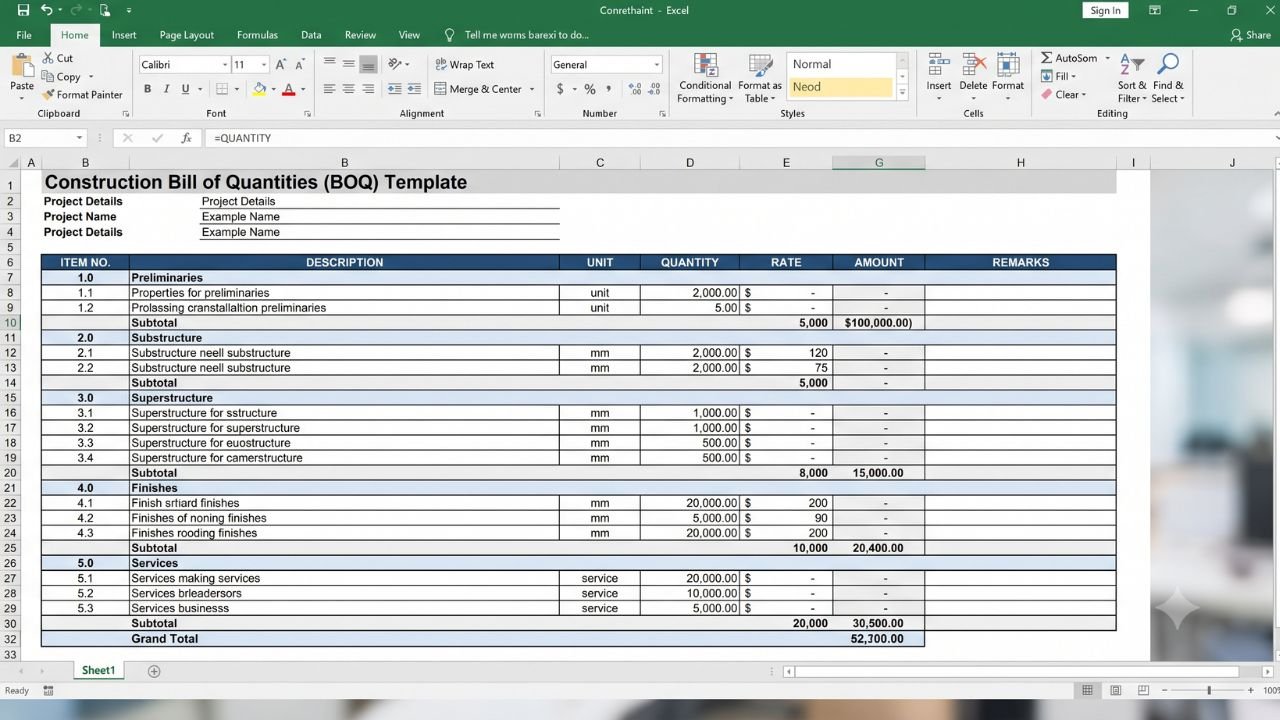
Your residential BOQ template should include the following columns:
-
Item No. for sequential numbering.
-
Description with clear, detailed scope.
-
Unit such as Sq.ft, Cu.yd, LF, Each.
-
Quantity measured from drawings or takeoff.
-
Rate in dollars per unit.
-
Amount calculated as Quantity × Rate.
-
Remarks for notes, assumptions, or drawing references.
Formulas and auto-calculations
A well-designed construction BOQ Excel file uses formulas for:
-
Amount = Quantity × Rate.
-
Section subtotals using SUM.
-
Grand total at the end.
This reduces manual errors and makes updates faster when quantities or rates change.
Buy Construction BOQ Template at $97 Only
Remarks and assumptions section
Include space for:
-
Scope clarifications.
-
Assumptions such as soil conditions, roof pitch, and height criteria.
-
Drawing references and revision notes.
This helps when explaining your estimate to owners, lenders, or subcontractors.
Professional formatting
Use:
-
Bold headings for sections and columns.
-
Borders and shading for readability.
-
Currency formatting for rates and amounts.
-
Consistent fonts and spacing.
A clean, professional format improves credibility and makes the BOQ easier to use.
Buy Construction BOQ Template at $97 Only
Sample Construction BOQ Template Excel Structure
A good Construction BOQ template Excel file should follow a consistent column and section structure. This makes the estimate more professional and easier to update across multiple projects.
Recommended columns
You can also add optional columns such as:
-
Material rate.
-
Labor rate.
-
Equipment rate.
-
Waste allowance.
-
Trade category.
-
Drawing reference.
Formula setup in Excel
Your BOQ template Excel should use formulas, not manual totals.
Use Excel formulas for:
-
Amount = Quantity × Rate.
-
Section subtotal = SUM of section items.
-
Grand total = SUM of all sections.
-
Optional contingency or tax calculations.
-
Markup or overhead percentage if needed.
This makes the sheet easier to maintain and safer for repeated revisions. You can also use separate sheets or tabs for:
-
Summary: overall totals and section summaries.
-
Detailed BOQ: full itemized list by trade or section.
-
Rate analysis or assumptions: pricing basis and notes.
Buy Construction BOQ Template at $97 Only
Sample BOQ for a Florida Single-Family Home (Illustrative)
The following table shows an illustrative construction BOQ template Excel sample for a Florida-style single-family home with slab-on-grade, concrete block, stucco, and tile roof. This is only an example of format and item style. Actual quantities and rates will vary by design, location, and finish level.
| Item No. | Description | Unit | Quantity | Rate ($) | Amount ($) | Remarks |
|---|---|---|---|---|---|---|
| 1 | Site clearance and grubbing for single-family lot | Sq.ft | 3,500 | 0.45 | 1,575 | Typical 1/4 acre lot |
| 2 | Excavation for slab and footings, average depth 1 ft | Cu.yd | 120 | 25 | 3,000 | Including backfill and compaction |
| 3 | 4-inch concrete slab-on-grade, 3,000 psi, with vapor barrier and mesh | Sq.ft | 2,200 | 4.20 | 9,240 | Monolithic slab with footings |
| 4 | 8-inch CMU exterior walls, grouted and reinforced | Sq.ft | 3,800 | 9.50 | 36,100 | Including lintels and rebar |
| 5 | Interior CMU partitions, 6-inch | Sq.ft | 1,600 | 8.20 | 13,120 | Load-bearing and partition walls |
| 6 | Exterior stucco finish, 3-coat system | Sq.ft | 3,800 | 3.75 | 14,250 | Textured and painted |
| 7 | Clay tile roof system, including underlayment and flashings | Sq.ft | 2,600 | 6.50 | 16,900 | Hurricane straps included |
| 8 | Impact-resistant windows and exterior doors | Each | 14 | 850 | 11,900 | Per opening average |
| 9 | Interior drywall, tape, texture, and paint | Sq.ft | 6,500 | 1.90 | 12,350 | Walls and ceilings |
| 10 | Ceramic tile flooring in wet areas, 12×12 inch | Sq.ft | 650 | 5.20 | 3,380 | Bathrooms, kitchen, laundry |
Illustrative total
The above sample is only meant to show the format and type of items for a Florida-style home. A full construction estimate Excel template will have many more items such as fine grading, landscaping, driveway, fencing, plumbing and electrical rough-ins, and finish fixtures. Actual quantities, rates, and items must be based on your drawings, specifications, and local market rates in your Florida region such as South Florida, Central Florida, or the Panhandle.
How to Use a Construction BOQ Template Excel File
Follow these steps to use a Construction BOQ template Excel file effectively for your residential or small commercial projects.
Buy Construction BOQ Template at $97 Only
Step 1: Download or open your template
Open your Construction BOQ template Excel file in Excel or a compatible spreadsheet program.
Step 2: Enter project details in the header
Fill in:
-
Project name and address.
-
Client name and contact.
-
General contractor or consultant details.
-
Date and revision number.
Step 3: Review the pre-defined sections
Check the sections such as sitework, concrete, masonry or frame, roofing, finishes, and external works. Add or remove sections if needed for your specific project type.
Step 4: Input quantities from your takeoff
Enter measured quantities for each item based on your plans or takeoff. Be consistent with units and double-check critical items such as slab, block, and roof.
Step 5: Enter unit rates
Use your current market rates or subcontractor quotes. Keep your rate basis consistent, such as material plus labor plus overhead plus profit.
Step 6: Check formulas
Ensure that Amount equals Quantity multiplied by Rate for all rows. Verify section subtotals and grand total calculations.
Step 7: Add remarks and assumptions
Clarify scope, assumptions, and any exclusions in the Remarks column or a separate notes sheet.
Step 8: Save and version your file
Use clear file naming such as ProjectName_BOQ_v1_2026-07.xlsx. This helps track revisions and avoid confusion.
Using a well-structured template like the Construction BOQ template Excel from Estimate Florida can save significant time and reduce errors on each new project.
Buy Construction BOQ Template at $97 Only
Common Mistakes with Construction BOQ Templates in Excel
Many contractors and estimators make avoidable mistakes when using a BOQ template Excel construction file.
Common mistakes to avoid
-
Using generic templates without customization: Templates not aligned with US or Florida construction practices, such as missing slab, block, stucco, or impact windows.
-
Vague descriptions: Concrete work or roofing without specifying slab thickness, PSI, roof type, or scope.
-
Inconsistent units: Mixing square feet and square yards, or cubic feet and cubic yards, without clear conversion.
-
Ignoring waste and overbreak: Not allowing for concrete overbreak, block cutting waste, or tile breakage.
-
Hard-coded totals: Typing totals instead of using formulas, causing errors when quantities or rates change.
-
No section breakdown: One long list without logical grouping, making the BOQ hard to read and compare.
These errors can lead to wrong estimates, budget issues, and disputes. A structured bill of quantities template Excel reduces these risks significantly.
How Estimate Florida’s Construction BOQ Template Helps
If you want a ready-to-use BOQ structure instead of building one from scratch, you can use our Construction BOQ Template here: Construction BOQ Template
Estimate Florida designed this template specifically for US and Florida residential and small commercial projects. It includes pre-defined sections for sitework and earthwork, concrete and foundations including slabs and footings, masonry or framing, roofing for tile, metal, or shingle systems, exterior and interior finishes, doors and windows, basic MEP, and site improvements.
Key benefits of the template
-
Saves hours of setup time for each new Florida project.
-
Reduces risk of missing items, wrong units, or calculation errors.
-
Provides a consistent, lender- and owner-ready BOQ structure.
-
Makes it easy to update quantities or rates without breaking the sheet.
This template is built from real Florida projects and refined over years of estimating work in the state. If you need help with broader construction estimating, Estimate Florida also provides concrete estimating services Florida, electrical estimating services, structural steel estimating services, general estimating services, and project-specific support through the contact page.
Best Practices for Using Construction BOQ Templates in Excel
If you want your residential BOQ template Excel to stay useful over time, follow these best practices.
Start with a Florida or US-focused master template
Create one standard format with sections for slab, block, stucco, tile roof, impact windows, and other common items. Reuse and adapt it for each new project.
Keep descriptions consistent
Use a standard wording pattern for similar items across projects. For example:
-
Supply and install concrete slab-on-grade.
-
Excavate footing trench in ordinary soil.
-
Install floor tile including bedding and grout.
This keeps your BOQ professional and comparable across jobs.
Maintain a local rate library
Use a separate sheet for:
-
Concrete rates.
-
Masonry rates.
-
Roofing rates.
-
Stucco and painting rates.
-
Door and window rates.
Update the rate library regularly based on market changes in your Florida or US region.
Buy Construction BOQ Template at $97 Only
Use clear file naming and version control
Examples:
-
ProjectName_BOQ_v1.xlsx
-
ProjectName_BOQ_v2.xlsx
-
ProjectName_BOQ_Final.xlsx
This prevents confusion when multiple revisions are shared.
Cross-check with past projects
Compare:
-
Cost per square foot.
-
Concrete quantity per square foot.
-
Roofing area versus floor area.
-
Number of openings.
-
Finish scope level.
This gives a sanity check before final pricing.
Final Thoughts: Choose the Right Construction BOQ Template Excel for Your Projects
A well-structured Construction BOQ template Excel file is essential for accurate estimating, clear contracts, and better cost control. Using Excel with proper columns, formulas, and sections makes BOQ preparation faster and more reliable for Florida and US contractors. Whether you are a general contractor, developer, site engineer, project manager, or QS professional, having a professional construction BOQ Excel template is a key part of running a successful estimating workflow.
Estimate Florida understands the unique needs of Florida and US construction estimating and provides practical tools and templates that support real workflows. Use the sample structure and example items in this article as a reference for your own projects. Consider adopting a standardized template like the Construction BOQ Template from Estimate Florida to save time, reduce errors, and improve consistency across all your estimates.