FastPIPE estimating software is a specialized plumbing and mechanical estimating platform designed for digital plan takeoff, material and labor estimating, job specifications, assemblies, reporting, and Excel export. It may be relevant to commercial plumbing, mechanical piping, HVAC-related piping, industrial piping, equipment connections, fabrication, and installation estimating.
FastPIPE is not automatically the best option for every contractor. Its suitability depends on the company’s project types, estimator workflow, team size, drawing formats, pricing requirements, budget, training capacity, and need for cloud collaboration or customized integrations.
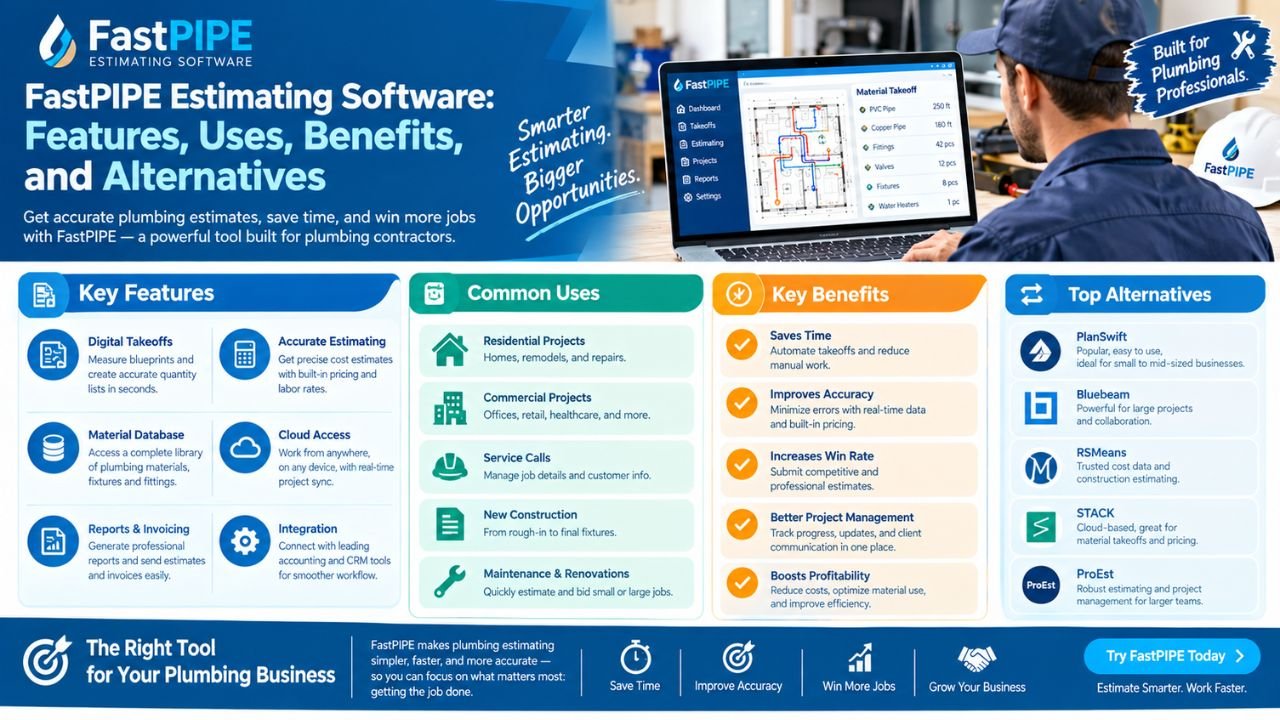
This guide reviews FastPIPE features, common users, takeoff workflow, catalog and assembly functions, Florida-specific considerations, pricing questions, training, limitations, alternatives, and custom software options. Product features, operating requirements, catalogs, pricing, and support policies can change, so users should verify current information directly with FastEST before making a purchase decision.
What Is FastPIPE Estimating Software?
FastPIPE is plumbing and mechanical estimating software intended for commercial and industrial contractors. According to the official product information, it supports plumbing and mechanical pricing catalogs, digital plan formats, customizable job specifications, on-screen digitizer takeoffs, adjustable labor rates, job-specific material pricing, reports, assemblies, templates, and Excel export.
It may be used for:
-
Commercial plumbing.
-
Mechanical piping.
-
HVAC-related piping.
-
Industrial piping.
-
Equipment connections.
-
Pumps and boilers.
-
Chillers and coils.
-
Gas connections.
-
Piping fabrication and installation.
-
Mechanical room work.
-
Repetitive commercial projects.
The official FastPIPE product page describes the product as a plumbing and mechanical estimating platform with digital plan support, a pricing catalog, customizable specifications, on-screen takeoff, labor adjustments, job-specific material pricing, reports, assemblies, templates, and Excel output.
In practical terms, FastPIPE helps an estimator move from plan review to measured quantities, selected materials, labor calculations, assemblies, reports, and a final bid workbook.
It is primarily an estimating and takeoff system. It should not be confused with full field-service software for dispatching, customer relationship management, technician tracking, invoicing, or residential service scheduling.
Who Uses FastPIPE?
FastPIPE may be useful for companies that repeatedly estimate plumbing and mechanical scopes from commercial or industrial plans.
Potential users include:
-
Commercial plumbing contractors.
-
Mechanical contractors.
-
HVAC contractors.
-
Industrial piping contractors.
-
Estimating departments.
-
Specialty subcontractors.
-
Mechanical project managers.
-
General contractors reviewing trade bids.
-
Companies estimating repetitive commercial work.
-
Contractors handling equipment and piping connections.
A contractor may evaluate FastPIPE when estimates require detailed pipe, fittings, valves, hangers, equipment, labor, material pricing, and job-specific specifications.
When it may be less suitable
FastPIPE may be less suitable for:
-
Very small service-only plumbing businesses.
-
Contractors needing mostly dispatch and invoicing.
-
Companies estimating only simple residential repairs.
-
Teams wanting a browser-first collaboration platform.
-
Businesses requiring a highly specialized custom workflow.
-
Contractors that do not have time to configure catalogs and assemblies.
-
Companies whose main process is field estimating rather than plan-based takeoff.
A residential service plumber who primarily prices water-heater replacements, drain repairs, and fixture changes may need mobile service software more than a detailed commercial estimating platform.
A commercial contractor estimating large piping projects may need deeper catalog, assembly, labor, and reporting capabilities than a general-purpose spreadsheet.
Main FastPIPE Features
The table below summarizes capabilities described in official FastPIPE materials and explains what contractors should consider before adopting them.
FastPIPE’s official product information states that its catalog includes more than 150,000 items and includes labor estimates associated with catalog items; contractors should still verify current catalog content, manufacturer coverage, and pricing before relying on it for a bid.
FastPIPE Digital Plan Takeoff Workflow
A typical FastPIPE workflow may look like this:
-
Create a customer, project, or job.
-
Add plans and related documents.
-
Confirm file versions and drawing dates.
-
Verify the page scale.
-
Review plumbing, mechanical, equipment, and detail drawings.
-
Configure job specifications.
-
Select materials and assemblies.
-
Measure pipe runs.
-
Count fittings, valves, fixtures, and equipment.
-
Apply labor and material pricing.
-
Add job factors, waste, rentals, or other costs.
-
Review reports by section, area, zone, or cost code.
-
Export the estimate to Excel or another required format.
-
Complete a final estimator review.
Scale verification
Scale verification is essential. A digital plan can be:
-
Printed at a different size.
-
Exported incorrectly.
-
Composed of multiple scales.
-
A scanned image without reliable scale information.
-
A sheet containing inset details with separate scales.
The official FastPIPE training information describes features for custom scaling, isometric plans, scaled regions, on-screen measurement, plan annotations, and revision overlays.
Drawing revision control
A commercial estimate should record:
-
Drawing issue date.
-
Revision number.
-
Addendum number.
-
Estimator.
-
Plan sheets reviewed.
-
Unresolved questions.
-
Scope assumptions.
-
Exclusions.
Digital tools can help compare revisions, but they do not replace review of the full document set. A changed architectural or mechanical detail may affect plumbing quantities even if the plumbing sheet itself appears unchanged.
FastPIPE Catalog, Assemblies, and Specifications
One of the more important parts of a plumbing and mechanical estimating system is the relationship between catalog items, job specifications, assemblies, labor, and supplier pricing.
Product catalogs
A catalog may include:
-
Pipe.
-
Fittings.
-
Valves.
-
Flanges.
-
Hangers.
-
Supports.
-
Equipment connections.
-
Fixtures.
-
Specialty materials.
-
Manufacturer-specific items.
The estimator should verify:
-
Material type.
-
Size ranges.
-
Joining method.
-
Manufacturer.
-
Current availability.
-
Supplier pricing.
-
Required accessories.
-
Installation labor.
Assemblies
Assemblies combine multiple items into a reusable package. Examples may include:
-
A boiler connection.
-
A pump package.
-
A chiller connection.
-
A gas appliance connection.
-
A bathroom group.
-
A mechanical-room valve arrangement.
-
A piping support package.
-
A coil connection.
Assemblies can reduce repetitive entry, but they should be reviewed against the company’s actual installation methods. A built-in assembly may not include every accessory, support, insulation requirement, or local project condition.
Custom specifications
Job specifications may determine:
-
Pipe material.
-
Fitting type.
-
Valve type.
-
Joining method.
-
Insulation.
-
Hangers.
-
Testing.
-
Equipment connections.
-
Installation standards.
FastPIPE’s official training page describes job-specific specifications, copied specifications, material discounts, labor factors, assemblies, templates, and supplier pricing workflows.
Internal estimating standards
Companies should document:
-
Standard labor rates.
-
Labor factors.
-
Material discounts.
-
Waste assumptions.
-
Markup.
-
Equipment allowances.
-
Freight.
-
Overtime.
-
Small-tools charges.
-
Testing and commissioning.
-
Exclusions.
Software is most useful when these assumptions are maintained consistently.
FastPIPE for Plumbing and Mechanical Projects
FastPIPE may be especially relevant where the estimator works repeatedly with commercial plumbing or mechanical plans and needs detailed item and labor organization.
FastPIPE for Florida Contractors
FastPIPE can organize quantities and prices, but Florida-specific assumptions still need to be entered and reviewed by the contractor.
Important considerations include:
Hurricane and wind-related construction details
Exterior piping, roof penetrations, equipment supports, and exposed components may require coordination with structural and project documents. Estimators should review the drawings and specifications rather than assume a standard assembly applies.
Flood zones and elevated equipment
Flood exposure can affect equipment location, access, underground services, drainage, and elevations. FEMA provides official flood mapping through its Flood Maps resources.
Coastal salt-air corrosion
Projects near the coast may need review of:
-
Materials.
-
Fasteners.
-
Supports.
-
Exterior equipment.
-
Protective coatings.
-
Replacement allowances.
-
Maintenance assumptions.
High humidity and moisture
Humidity can affect sequencing, storage, testing, insulation, equipment rooms, and exterior work.
Storm drainage
Roof drains, leaders, area drains, underground storm piping, and site drainage should be measured and priced separately from sanitary systems.
Regional pricing
Labor and material costs may differ between Miami, Tampa, Orlando, Jacksonville, Southwest Florida, the Florida Keys, and inland markets. A contractor should use current local supplier quotes and labor assumptions rather than relying on generic rates.
Local review and project requirements
The Florida Building Code is an official source for Florida construction-code information. The Florida Department of Business and Professional Regulation provides professional and business information. These sources can support project research, but FastPIPE does not determine legal compliance or replace professional review.
Benefits of FastPIPE
Potential benefits may include:
-
Centralized plumbing and mechanical estimating workflow.
-
Reusable job templates.
-
Digital plan measurement.
-
Custom job specifications.
-
Material and labor separation.
-
Supplier-specific pricing.
-
Report filtering and sorting.
-
Excel export.
-
Reusable assemblies.
-
Support for complex commercial scopes.
-
Plan annotations.
-
Revision overlays where supported.
-
Cost-code organization.
-
Custom labor factors.
-
Equipment and piping assemblies.
These features can help an estimating department organize information more consistently. They do not guarantee faster estimates, accurate bids, savings, profitability, or successful bid outcomes.
The strongest benefit may be workflow structure: an estimator can use defined specifications, catalog items, assemblies, labor factors, and reports instead of rebuilding every estimate from a blank spreadsheet.
Limitations and Challenges
A balanced FastPIPE review should also consider potential limitations:
-
Learning curve.
-
Setup time.
-
Catalog and price maintenance.
-
Need for accurate specifications.
-
Drawing quality and scale issues.
-
Manual review requirements.
-
Customization effort.
-
Training needs.
-
Data migration.
-
Collaboration limitations compared with some cloud-first platforms.
-
Possible Windows or desktop workflow considerations.
-
Pricing and support costs that must be verified.
-
Dependence on consistent internal estimating standards.
Catalog maintenance
A large catalog does not remove the need for review. Material availability, supplier pricing, manufacturer preferences, project specifications, and regional conditions may change.
Assembly maintenance
Assemblies must be updated when:
-
Installation methods change.
-
Material preferences change.
-
Labor productivity changes.
-
Project types change.
-
Suppliers change.
-
Specifications require different components.
-
The company identifies recurring omissions.
Collaboration
A contractor that requires browser-first access, real-time collaboration, or field review should evaluate how FastPIPE fits the company’s technology environment. A desktop or network-based workflow may work well for some teams and be less suitable for others.
FastPIPE Pricing and Licensing Considerations
Current FastPIPE pricing should be confirmed directly with FastEST. Pricing, licenses, maintenance plans, training, support, catalog access, and hardware requirements may change.
The official FastPIPE product page provides product information and access to current pricing or contact pathways.
Total ownership cost may include:
-
Software license.
-
Subscription or maintenance.
-
Training.
-
Implementation.
-
Catalog updates.
-
Support.
-
Additional users.
-
Hardware.
-
Data migration.
-
Custom configuration.
-
Internal setup time.
-
Price-library maintenance.
-
Integration work.
When comparing FastPIPE pricing with alternatives, do not compare only the initial license. Consider the cost of setting up labor rates, material discounts, supplier codes, job templates, specifications, assemblies, reports, and user training.
A practical cost review should ask:
-
How many estimators need access?
-
Is pricing maintained automatically or internally?
-
What support is included?
-
Is training included?
-
Are updates included?
-
Can data be exported?
-
Can the company use existing supplier pricing?
-
Is custom reporting available?
-
What hardware or operating environment is required?
FastPIPE Training and Implementation
Training matters because the software includes more than basic plan measurement.
The official FastPIPE training page describes training topics such as application setup, labor rates, material discounts, catalog management, supplier codes, digital plans, scaling, specifications, job items, assemblies, takeoff, reports, pricing exports, Excel workbooks, templates, and advanced features.
A practical implementation checklist includes:
-
Define company estimating standards.
-
Set up labor rates.
-
Import or configure supplier pricing.
-
Build common assemblies.
-
Create project templates.
-
Establish material discounts.
-
Configure job specifications.
-
Train users.
-
Test with completed projects.
-
Compare software output with a verified estimate.
-
Document review procedures.
-
Create revision and addenda controls.
-
Review reports with project managers.
-
Schedule periodic catalog and pricing updates.
Training should include quality control. Users need to understand not only how to measure but also how to review the result.
FastPIPE vs Excel
Excel remains useful for final bid presentation, custom calculations, supplier comparisons, and management summaries. FastPIPE may provide a more structured takeoff workflow for plumbing and mechanical projects.
FastPIPE vs Customized Estimating Software
Standard software
A standard system such as FastPIPE may offer:
-
Faster adoption than custom development.
-
An established estimating workflow.
-
Existing catalogs.
-
Built-in assemblies.
-
Standard reports.
-
Training resources.
-
A known product roadmap.
The tradeoff is that the company may need to adapt some processes to the software.
Customized software
Custom development may offer:
-
Company-specific assemblies.
-
Customized reports.
-
Specialized pricing rules.
-
Unique customer or general-contractor portals.
-
Internal system integrations.
-
Custom residential and commercial workflows.
-
Mobile review.
-
Specialized dashboards.
-
Workflow-specific approvals.
The tradeoff is that custom development requires planning, design, testing, training, maintenance, and future improvement.
Estimate Florida can help you develop customized plumbing and mechanical estimating software for your business. To discuss your requirements, email us at info@estimateflorida.com.
Alternatives and How to Compare Them
FastPIPE alternatives should be evaluated by category rather than by broad claims that one product is universally superior.
General digital takeoff platforms
These may support PDF measurement, counts, areas, lengths, annotations, and reports. They may be useful when the contractor wants flexible takeoff but does not require a specialized plumbing catalog.
Mechanical estimating platforms
These may provide plumbing, piping, HVAC, labor, material, and assembly functions. They may be suitable for commercial mechanical contractors with detailed trade requirements.
Plumbing-specific estimating tools
These may focus on fixture counts, piping, assemblies, residential estimates, or commercial plumbing. Contractors should verify whether the tool covers their actual pipe materials, fittings, valves, labor methods, and reporting needs.
BIM-connected workflows
These may be useful for contractors receiving coordinated models. The quality of the estimate still depends on model completeness and coordination.
Cloud collaboration tools
These may be useful for distributed estimating teams, remote review, and centralized plan access.
Excel-based estimating systems
These may work well for contractors with established spreadsheet processes, simple projects, or client-specific bid formats.
Custom-built software
This may be suitable when a company needs unique workflows that standard platforms cannot provide efficiently.
Compare:
-
Plumbing and mechanical coverage.
-
Plan formats.
-
Catalog depth.
-
Labor-rate customization.
-
Assemblies.
-
Supplier pricing.
-
Revision handling.
-
Excel and PDF export.
-
User access.
-
Training.
-
Support.
-
Total cost.
-
Data ownership.
-
Integration options.
How to Decide Whether FastPIPE Is Right for You
FastPIPE may be worth evaluating if the business:
-
Estimates commercial plumbing or mechanical work.
-
Needs digital plan takeoff.
-
Uses reusable assemblies.
-
Wants custom job specifications.
-
Needs material and labor reports.
-
Uses Excel for final bid development.
-
Estimates repetitive or complex projects.
-
Has staff available for training and setup.
-
Needs detailed piping and equipment estimates.
-
Wants supplier-specific pricing and labor factors.
A different solution may be better if the business:
-
Performs mostly residential service calls.
-
Needs full scheduling, dispatch, and invoicing.
-
Requires browser-first collaboration.
-
Has very simple estimating needs.
-
Needs a highly specialized custom workflow.
-
Does not have staff to maintain catalogs and assemblies.
-
Primarily estimates from field observations rather than plans.
Before purchasing, test the workflow with one real project.
Final Thoughts
FastPIPE estimating software is a specialized plumbing and mechanical estimating platform with digital takeoff, catalogs, specifications, assemblies, reporting, and Excel export. It may be useful for commercial plumbing, mechanical piping, HVAC-related piping, industrial piping, equipment connections, and other detailed estimating work.
Its suitability depends on the contractor’s project types, workflow, estimating volume, team, budget, drawing formats, pricing requirements, and willingness to configure and maintain the system. Product features, pricing, operating requirements, catalogs, training, and support policies may change.
FastPIPE may be more than a small service-only plumbing business needs, while a commercial mechanical contractor may value its catalog, assemblies, labor controls, job specifications, reports, and digital takeoff functions. A customized system may be more appropriate when the company needs specialized workflows, integrations, reports, or customer portals.
Software should support—not replace—qualified estimator review. Plans, specifications, supplier pricing, labor assumptions, project conditions, and human judgment remain essential.
If you need plumbing or mechanical estimating software designed around your business, email Estimate Florida at info@estimateflorida.com to discuss your requirements.