If you are searching for a sample BOQ for house construction Excel for Florida projects, this guide will help you understand the right structure, scope, and formatting needed for residential estimating. A Bill of Quantities is essential for accurate house construction budgeting, clear scope definition between owner and contractor, progress billing, and day-to-day cost control. For contractors, estimators, civil professionals, and self-builders working in Florida, a clear BOQ in Excel is one of the most practical tools for managing residential construction costs.
Free download: sample house construction BOQ (Excel)
8 sections, about 30 line items, units and example quantities for a Florida CBS house, with subtotals and a summary sheet that calculate automatically.
Get the free sample BOQ or see the full BOQ template
👉Buy Construction BOQ Template at $97 Only
Excel is widely used because it is easy to customize, simple for formula-based calculations, and accepted by contractors, consultants, and clients. In this article, you will learn what a Florida house construction BOQ includes, why Excel remains the preferred format, how to structure your own residential building BOQ Excel sheet, and what sample items to include. You will also see how a ready-made professional template can save time when preparing estimates for Florida homes.
👉Buy Construction BOQ Template at $97 Only
What Is a BOQ for House Construction?
A BOQ, or Bill of Quantities, is a structured document that lists the work items needed to complete a house construction project. Each line item typically includes a description of work, unit of measurement, quantity, rate, and total amount. In residential projects, the BOQ helps organize all cost-bearing items in a format that is easy to price, review, and update.
For house construction in Florida, a BOQ is commonly used for:
-
Budget planning before starting the project.
-
Contractor pricing and bid comparison.
-
Loan or financing documentation support.
-
Stage-wise billing and payment tracking.
-
Cost control during execution.
-
Pricing of changes and variations.
A residential BOQ is useful for:
-
Small contractors.
-
Quantity surveyors.
-
Site engineers.
-
Civil engineers.
-
Owner-builders and self-builders.
-
Consultants and design professionals.
A typical house construction estimate Excel sheet for Florida may include:
-
Site preparation and preliminaries.
-
Earthwork and foundations.
-
Concrete and masonry work.
-
Structural framing.
-
Roofing.
-
Insulation and drywall.
-
Flooring and finishes.
-
Doors and windows.
-
Painting.
-
Plumbing and electrical.
-
HVAC allowances if included.
-
Driveways, walkways, and external works.
👉Buy Construction BOQ Template at $97 Only
Why Use Excel for House Construction BOQ?
Excel remains one of the best formats for preparing a BOQ for house construction Excel because it is flexible and easy to manage.
Main advantages of Excel
-
Easy to customize for each house project.
-
Formulas help calculate quantity × rate automatically.
-
Section totals and grand totals can be generated quickly.
-
Easy to print, email, and revise.
-
Familiar to contractors, engineers, and clients.
-
Reusable for future residential projects.
A properly structured residential building BOQ Excel sheet reduces manual errors and helps estimators update costs quickly when quantities, rates, or specifications change. For Florida projects, where pricing can vary based on county, labor availability, code requirements, and finish level, Excel gives you a fast way to revise estimates without rebuilding the entire sheet.
👉Buy Construction BOQ Template at $97 Only
Key Sections in a Sample BOQ for House Construction Excel
A professional BOQ template for house construction should be grouped into clear sections. This makes the estimate more readable and also helps with review, pricing, billing, and tracking.
1. Preliminaries and General Items
This section includes setup and project-level costs such as:
-
Site mobilization.
-
Temporary utilities.
-
Site cleaning.
-
Safety provisions.
-
Layout and setting out.
-
Supervision or general project overheads.
2. Site Work and Earthwork
For residential work in Florida, this section may include:
-
Clearing and grubbing.
-
Excavation for footings.
-
Backfilling and compaction.
-
Disposal of unsuitable material.
-
Grading and leveling.
3. Foundations and Concrete Work
This section is one of the most important in a house construction estimate Excel format. Typical items include:
-
PCC or base concrete.
-
Reinforced concrete footings.
-
Stem walls.
-
Slab-on-grade.
-
Reinforcement steel.
-
Formwork.
-
Anchor bolts and embeds.
4. Masonry or Framing Work
Depending on the house type, the BOQ may include:
-
Concrete block walls.
-
Wood framing.
-
Structural steel where required.
-
Beams, lintels, and wall supports.
-
Roof trusses or framing members.
5. Roofing
Roofing is often a separate major cost section in Florida residential projects. Items may include:
-
Roof sheathing.
-
Waterproofing underlayment.
-
Shingles, tiles, or metal roofing.
-
Flashing.
-
Ridge vents.
-
Gutters and downspouts.
6. Finishes
A sample BOQ Excel format should clearly separate finishing works, such as:
-
Internal drywall or plaster.
-
Floor finishes.
-
Ceiling finishes.
-
Kitchen backsplash.
-
Bathroom wall tiles.
-
Trim and molding.
7. Doors, Windows, and Joinery
This section may include:
-
Main entry doors.
-
Interior doors.
-
Sliding glass doors.
-
Aluminum or UPVC windows.
-
Frames and ironmongery.
-
Closets and basic built-ins.
8. Painting and Coatings
Typical items include:
-
Interior primer.
-
Interior wall paint.
-
Exterior weather-resistant paint.
-
Ceiling painting.
-
Wood or metal finishes.
9. Plumbing, Electrical, and HVAC Allowances
Depending on the contract arrangement, the civil BOQ for residential building may include basic MEP items such as:
-
Water supply piping.
-
Drainage piping.
-
Bathroom fixtures.
-
Electrical conduits and wiring.
-
Switches and receptacles.
-
Panel board.
-
HVAC rough-ins or allowances.
10. External Works
This may include:
-
Driveway concrete.
-
Walkways.
-
Patio slabs.
-
Boundary fence.
-
Landscaping allowance.
-
Stormwater-related small works.
Sample BOQ for House Construction Excel: Structure and Columns
A good sample BOQ for house construction Excel should use consistent column headings so the estimate remains professional and easy to update.
Recommended Excel columns
You can also add optional columns such as:
-
Material rate.
-
Labor rate.
-
Equipment rate.
-
Waste allowance.
-
Trade category.
-
Drawing reference.
Formula setup in Excel
A professional BOQ for house construction Excel format should use formulas, not manual totals.
Use Excel formulas for:
-
Amount = Quantity × Rate.
-
Section subtotal = SUM of section items.
-
Grand total = SUM of all sections.
-
Optional tax or contingency calculation.
-
Markup or overhead percentage if needed.
This makes the sheet easier to maintain and safer for repeated revisions.
👉Buy Construction BOQ Template at $97 Only
Sample BOQ for House Construction Excel: Example Items
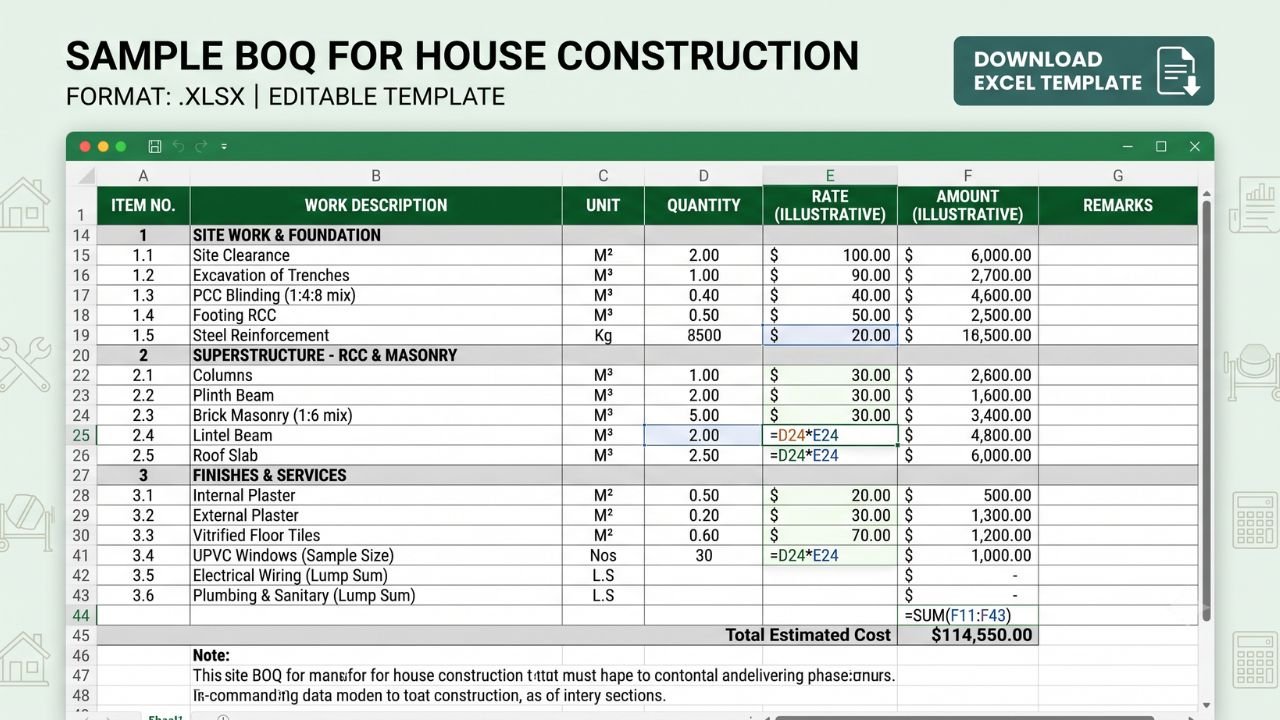
Below is an illustrative sample BOQ for house construction Excel for a small to medium Florida residential project. This is only an example of format and item style. Actual quantities and rates will vary by design, location, code requirements, and finish level.
Illustrative total
The above sample is only meant to show the format and line-item style. A real residential building BOQ Excel sample for Florida will usually contain dozens or even hundreds of items, especially when broken into full trade-level detail.
A full BOQ may also include:
-
Vapor barrier below slab.
-
Termite treatment.
-
Anchor straps and hurricane-related items.
-
Insulation.
-
Waterproofing.
-
Baseboards and trim.
-
Cabinets and countertops.
-
Appliance allowances.
-
Landscaping and drainage improvements.
👉Buy Construction BOQ Template at $97 Only
How to Create Your Own BOQ for House Construction in Excel
If you want to prepare your own BOQ template for residential building, use the following step-by-step method.
1. Collect drawings and specifications
Start with:
-
Site plan.
-
Floor plans.
-
Elevations.
-
Sections.
-
Structural drawings.
-
MEP drawings if available.
-
Finish schedules and material notes.
Without drawings and specifications, your BOQ will be incomplete.
2. Define the BOQ sections
Create the major headings first, such as:
-
Preliminaries.
-
Earthwork.
-
Concrete.
-
Framing or masonry.
-
Roofing.
-
Finishes.
-
Doors and windows.
-
Painting.
-
Plumbing.
-
Electrical.
-
External works.
This creates a clean structure before you begin quantity takeoff.
3. Set up your Excel format
Create a standard spreadsheet layout with:
-
Bold section headings.
-
Clear item numbering.
-
Currency formatting.
-
Quantity and rate columns.
-
Formula-driven totals.
A reusable master format saves time on every new project.
4. Take off quantities from drawings
Measure:
-
Lengths for linear items.
-
Areas for surface items.
-
Volumes for concrete and excavation.
-
Counts for doors, windows, and fixtures.
Enter these quantities carefully and keep units consistent.
5. Enter rates
Use your latest local pricing for Florida. This may include:
-
Material costs.
-
Labor costs.
-
Equipment charges.
-
Overheads.
-
Waste allowance.
-
Profit margin.
Keep your rate-building method consistent across the entire BOQ.
6. Add formulas
Your house construction estimate Excel sheet should always calculate automatically.
Typical setup includes:
-
Amount = Quantity × Rate.
-
Section subtotal formulas.
-
Grand total formula.
-
Contingency row if needed.
-
Optional tax rows.
7. Add assumptions and remarks
Use the remarks column for:
-
Material grade assumptions.
-
Height limits.
-
Soil assumptions.
-
Finish type.
-
Scope clarifications.
-
Exclusions.
This reduces confusion during pricing and contract discussion.
8. Review and cross-check
Before issuing the BOQ:
-
Recheck units.
-
Recheck formulas.
-
Confirm item descriptions.
-
Make sure no major trade is missing.
-
Compare total quantities against similar past projects.
This review step is critical for avoiding errors.
👉Buy Construction BOQ Template at $97 Only
Common Mistakes in House Construction BOQ in Excel
Many estimators and contractors make avoidable mistakes when preparing a sample BOQ for house construction Excel file.
Common mistakes
-
Missing items such as lintels, trims, sealants, flashing, termite treatment, or external works.
-
Vague descriptions that do not clearly define scope.
-
Inconsistent units between drawings and BOQ.
-
Manual totals instead of Excel formulas.
-
No section-wise breakdown.
-
No remarks or assumptions.
-
Mixing material supply scope with labor-only pricing without clear separation.
-
Failing to update rates for location-specific conditions.
These errors can lead to underpricing, disputes, billing issues, and poor cost control.
👉Buy Construction BOQ Template at $97 Only
How Estimate Florida’s Construction BOQ Template Helps
If you want a ready-to-use BOQ structure instead of building one from scratch, you can use our Construction BOQ Template here: Construction BOQ Template
Estimate Florida designed this template for residential and small commercial projects where clear item structure, consistent formatting, and easy updates matter. It includes standard BOQ sections such as site work, foundation, concrete, masonry or framing, roofing, finishes, doors and windows, painting, basic service allowances, and external works.
Key benefits of the template
-
Saves hours of setup time.
-
Reduces missing-item risk.
-
Uses formula-based totals.
-
Gives a professional, client-ready BOQ format.
-
Makes quantity and rate updates much easier.
-
Helps maintain consistency across projects.
This template is based on real estimating workflows and is useful for contractors, estimators, site engineers, and self-builders who want a practical sample BOQ Excel format without starting from zero. Estimate Florida also supports related estimating needs such as concrete estimating services, electrical estimating services, structural steel estimating services, general estimating services, and project-specific support through the contact page.
Best Practices for House Construction BOQ in Excel
If you want your BOQ template for house projects to stay useful over time, follow these best practices.
Use a master template
Create one standard format and adapt it for each new residential project.
Keep descriptions consistent
For example, use a standard wording pattern like:
-
Supply and install concrete slab.
-
Excavate footing trench in ordinary soil.
-
Install floor tile including bedding and grout.
This keeps your BOQ professional and comparable across jobs.
Maintain a rate library
Use a separate sheet for:
-
Concrete rates.
-
Framing rates.
-
Drywall rates.
-
Tile rates.
-
Painting rates.
-
Door and window rates.
Update the rate library regularly so your future BOQs stay current.
Use file naming and version control
Examples:
-
Florida_House_A_BOQ_v1.xlsx
-
Florida_House_A_BOQ_v2.xlsx
-
Florida_House_A_BOQ_Final.xlsx
This prevents confusion when multiple revisions are shared.
Cross-check with similar projects
Compare:
-
Cost per square foot.
-
Concrete quantity per square foot.
-
Roofing area versus floor area.
-
Number of openings.
-
Finish scope level.
This gives a sanity check before final pricing.
Final Thoughts: Use a Structured Sample BOQ for Accurate House Estimates
A well-prepared sample BOQ for house construction Excel is one of the most useful tools for accurate estimating, clear scope definition, billing control, and professional project management. For Florida residential construction, Excel remains a practical choice because it is flexible, easy to update, and widely accepted by contractors and clients.
👉Buy Construction BOQ Template at $97 Only
If you are a contractor, estimator, engineer, or self-builder, use the sample structure in this article as a starting point for your own projects. A clear BOQ for house construction Excel format with proper sections, formulas, and item descriptions will help you price more confidently and manage residential work more professionally. Estimate Florida focuses on practical estimating tools and structured BOQ systems that support real construction workflows, making it easier to prepare better estimates with less wasted time.